 Log in

 Learn AI literacy via Google’s latest AI Quests lesson on neuroscience, “Polar Peaks.”

Saint-Hyacinthe, Quebec



htmx 4 has been released, featuring a transition from XMLHttpRequest to the fetch() API, enhancing streaming capabilities. Key updates include built-in morphing swaps for DOM state preservation and an hx-partial tag for cleaner updates. Attribute inheritance is now explicit, with event names standardized. The library maintains focus on minimal JavaScript while remaining popular among frameworks.
By Daniel Curtis
Saint-Hyacinthe, Quebec


Most of us can rattle off the first few words-that-stand-for-letters of the NATO phonetic alphabet. Alfa, Bravo, and Charlie no doubt come right to mind, and depending on how many war movies you’ve seen, so may Delta, Echo, and Foxtrot. But how many of us would recognize Kilo, Mike, and Sierra? For that matter, how much do any of us know about how these particular words came to be used to spell out other words when communicating over walkie-talkies or other low-fidelity communication systems? In the video above for his YouTube channel RobWords, YouTuber Rob Watts explains the development of and logic behind the NATO phonetic alphabet, wasting no time in clarifying that it isn’t a phonetic alphabet, nor was it created by NATO.
What we actually have here, Watts says, is a “spelling alphabet,” and its story goes back to the invention of the telephone in the eighteen-seventies. “Early telephonists found that if ever they needed to spell something out, like someone’s name, one letter would get misheard as another.” The idea of expressing each letter with a common word starting with that letter arose naturally, though figuring out exactly which words to use took a lot more trial and error.
In the early nineteen-tens, Western Union published a spelling alphabet consisting mostly of the names of people and places: Adams, Boston, Chicago, Denver, Edward, and so on. By World War I, the British army had also implemented a rather more eccentric version, using words like Beer, Monkey, Nuts, Orange, Pip, and Yorker; by World War II, “every armed service in Britain and the U.S. had developed its own spelling alphabet.”
In light of the rapidly globalizing nature of human affairs, and not just the military kind, the need for a single universal spelling alphabet became pressing. It wasn’t until the establishment of the International Civil Aviation Organization, meant to oversee the skies in peacetime, that earnest work began on a revision of the U.S.-U.K. combined forces’ existing spelling alphabet, incorporating English words easily pronounceable by non-English speakers, while also being minimally confusable for one another. By 1956, ICAO finalized its list, which has remained the NATO phonetic alphabet (or, officially, the International Radiotelephony Spelling Alphabet) we all know today — or we at least partially know. It may well be worth your time to memorize the rest, since you never know when you’ll have to keep your Papas and Quebecs straight.
Related Content:
The Alphabet Explained: The Origin of Every Letter
The Enigma Machine: How Alan Turing Helped Break the Unbreakable Nazi Code
What English Would Sound Like If It Was Pronounced Phonetically
Based in Seoul, Colin Marshall writes and broadcasts on cities, language, and culture. He’s the author of the newsletter Books on Cities as well as the books 한국 요약 금지 (No Summarizing Korea) and Korean Newtro. Follow him on the social network formerly known as Twitter at @colinmarshall.
Saint-Hyacinthe, Quebec

Agents deserve an architecture layer of their own rather than being lumped into frontend or backend, since they don’t behave quite the same as people or programs.
Every application we build sorts its callers into two camps. People use the frontend, and programs call the backend. This division often decides where every feature lives: screens and flows for users; endpoints and contracts for programs.
AI agents are a third kind of caller, and they are now moving into production traffic. An agent acting for a user might check a customer’s charges against an invoice and open a dispute when the numbers disagree, without a person clicking through screens and without a developer scripting the exact calls.
In this article, we highlight how agents deserve to be treated as a layer of their own, and work through what that layer changes about how humans interact with our software.
Frontend for People, Backend for Programs
The two-layer model encodes assumptions about who is calling. A frontend assumes a person: someone who can read a screen, weigh the options, recover from confusion and decide what happens next. Everything we invest in layout, affordances, empty states and error messages exists because the caller brings judgment and needs information presented in a form that supports it.
A backend API assumes the opposite kind of caller. A program follows a published contract exactly and never improvises. It sends the same shape of request every time, which is why we version endpoints and publish schemas, and why a malformed request counts as the caller’s bug rather than a misunderstanding to accommodate.
Both assumptions held for decades because every caller was one or the other. An agent, however, is neither. It calls APIs like a program, but it chooses which calls to make at runtime and changes course based on what it finds. A caller that brings judgment but has no use for our carefully designed screens is a new kind of consumer, and it needs a layer built for it.
What the Agent Layer Is
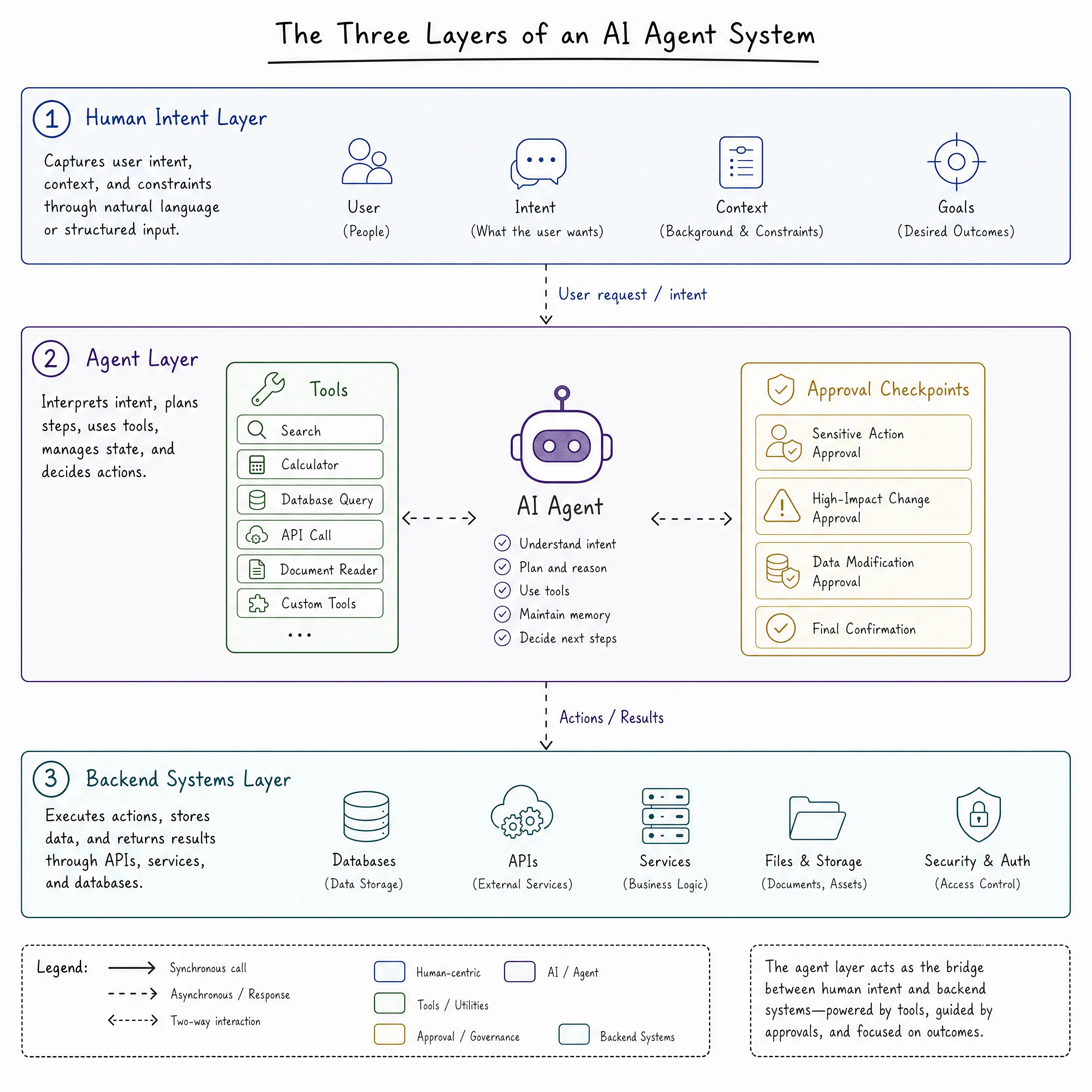
The agent layer is the part of the architecture where goals get turned into actions. An agent receives a goal rather than a request. It plans the steps, acts through tools, observes the results, and revises the plan until the goal is met or it escalates to a human. Tools are the operations we expose for that purpose, each with a name and typed parameters, plus a description the model can reason about.
At runtime, the layer is a loop. A simplified version looks like this (with the OpenAI Responses API and the gpt-5.6 model):
const input = [{ role: "user", content: goal }];

while (true) {
  const response = await openai.responses.create({
    model: "gpt-5.6",
    instructions: AGENT_PROMPT,
    tools,
    input,
  });

  // carry the model's output into the next request
  input.push(...response.output);

  const toolCalls = response.output.filter(
    (item) => item.type === "function_call"
  );

  // final answer, no more actions
  if (toolCalls.length === 0) {
    break;
  }

  for (const call of toolCalls) {
    // our code validates and runs the real operation
    const result = await executeToolCall(https://url.us.m.mimecastprotect.com/s/_r0jCM8X4XCq9PzroSJiZ9h8_aoG?domain=call.name, JSON.parse(call.arguments));

    input.push({
      type: "function_call_output",
      call_id: call.call_id,
      output: JSON.stringify(result),
    });
  }
}
Each pass through the loop, the model either requests a tool call or produces its final answer. When it requests a call, our code validates and executes the operation, and the result feeds the model’s next decision. The intelligence lives in the model, but every action runs through code we wrote.
Set beside the two layers we know (frontend and backend), the differences come into focus:
| Layer | Built for | The caller provides | Typical failure |
|---|---|---|---|
| Frontend | People reading screens | Clicks and form input | A confusing experience |
| Backend | Programs following contracts | Exact, well-formed requests | A broken contract, a 4xx or 5xx |
| Agent layer | Goals that require judgment | A described outcome | A wrong decision made confidently |
The layer runs in both directions. Some agents live inside our product, like a billing assistant that investigates a duplicate charge for a user. Others live outside it, like a customer’s accounts-payable agent calling in to reconcile invoices. In both cases, the layer occupies the same architectural position, sitting between someone’s intent and the systems that can satisfy it.
How Humans Interact with Agents
The frontend taught users to navigate: find the right page, open the right form, fill it in and click submit.
The agent layer replaces navigation with delegation. The user describes an outcome, and the agent works out the route. That shift comes with four interaction primitives that our interfaces need to support:
- Stating goals. The input is language rather than a form, which means the interface has to help users express outcomes clearly and confirm the agent understood the goal before it starts spending time and money on it.
- Approving actions. An agent that pauses before consequential actions and presents what it intends to do, with the evidence behind it, earns trust that a fully autonomous one never will. The approval moment is a UI surface, and designing it well matters as much as designing the checkout flow once did.
- Watching progress. Multistep work takes time, and a silent agent is indistinguishable from a stuck one. Streaming the current step (“found 12 overdue invoices, checking dispute flags”) keeps the user oriented and gives them a chance to catch a wrong turn early.
- Interrupting and correcting. Users change their minds and spot mistakes. The interface needs a way to stop the agent mid-task or redirect it without starting over.
Today, most of this happens in chat, which has become the default front door to the agent layer. Purpose-built UI patterns are forming around these chat interfaces: welcome screens that set expectations, source citations under generated answers, inline status while work runs and editors for refining what the agent produced.
What This Means for System Design
Those interaction patterns are the visible half of the work. The other half happens in the backend, and it starts with the tools. The capabilities buried in our click handlers and form submissions become tools the agent loop can call, and the description on each one matters, because that is what the model reads when deciding whether an action applies.
Permissions need rethinking too. An agent holding a user’s full credentials can do everything that user can do, wrong decisions included, so the safer pattern is to let agents read broadly and write narrowly, with write access granted per action.
The approval moments and progress updates from the last section also need a backend counterpart. Anything hard to reverse waits for a human, and every step gets logged so we can reconstruct what an agent did and why. On the integration side, the Model Context Protocol (MCP) standardizes how agents discover and call tools, and platforms like Progress Agentic RAG handle governed retrieval so the knowledge agents act on stays citable and permissioned.
An Outside Agent End to End
To see the layer at work from the other direction, we can follow a hypothetical agent example. A customer of our invoicing product runs an accounts-payable agent, and its standing job is to reconcile what the customer was billed against what they ordered.
- The customer connects the agent to our product using credentials we issued for it: read access to their invoices and one scoped write action,
open_dispute. - The agent discovers those actions through our MCP server, then pulls the month’s invoices and reconciles them against the customer’s purchase records.
- It finds a charge with no matching order. Opening a dispute is consequential, so it pauses and shows the customer the invoice and the mismatch.
- The customer approves, and the agent calls
open_disputewith the invoice ID and the evidence. Our backend validates the scoped permission and creates the dispute, and the full exchange lands in our logs.
No one opened our dashboard during any of this, and no one on the customer’s team wrote integration code against our API docs. The agent did the reconciling and the customer approved the dispute. Our side supplied the scoped operations and a log of every call.
Wrap-up
The stack has grown new layers before. The frontend split from the server when browsers became capable enough to carry an application, and the API layer grew into a product of its own when programs became its main consumers. Both felt like separate specialties at first, and both ended up as part of the ordinary full-stack job.
The agent layer is following the same path, and it depends on both layers around it. It needs frontends where humans can delegate and approve, and it needs backends that expose well-described and well-scoped operations. Full-stack developers already own those two layers, which makes us the natural owners of the one now growing between them.
For more on building AI-powered applications and agents with Progress, check out the following resources:
Saint-Hyacinthe, Quebec

Microsoft présente les nouveautés pour les développeurs C++ dans Visual Studio 2026, version 18.7 à 18.10, notamment des améliorations liées à Git, GitHub Copilot et au débogage
Au cours des derniers mois, Microsoft a publié des versions mensuelles de Visual Studio 2026, apportant des améliorations à toutes les étapes du cycle de développement. Voici un récapitulatif de toutes les modifications apportées entre les versions 18.7 et 18.10 qui concernent les développeurs C++. Cela inclut de nouveaux...

Au cours des derniers mois, Microsoft a publié des versions mensuelles de Visual Studio 2026, apportant des améliorations à toutes les étapes du cycle de développement. Voici un récapitulatif de toutes les modifications apportées entre les versions 18.7 et 18.10 qui concernent les développeurs C++. Cela inclut de nouveaux...
Saint-Hyacinthe, Quebec

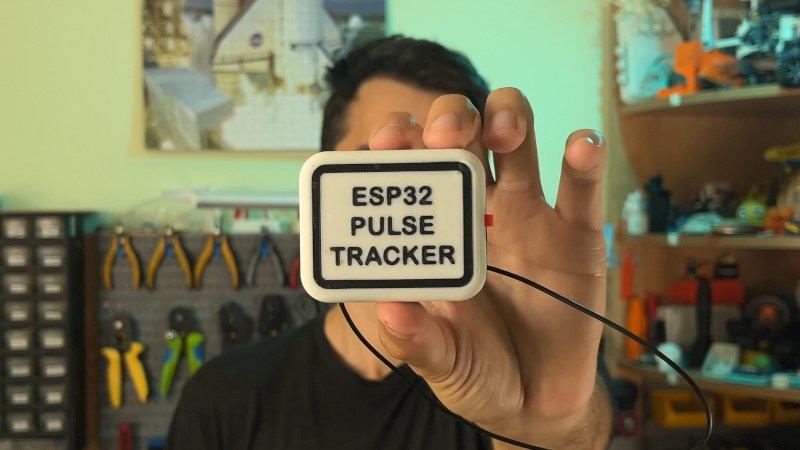
If you spend any time near a gym, you may be familiar with Bluetooth heart rate monitors — a small pack of electronics mounted on a strap round the chest which can relay heart rate data to an external logger or display. We’re pleased to see [Milos Rasic]’s project then, an open-source version of one of those monitors.
The heart rate capture is done by an AD8232, while the Bluetooth part is handled by a Seeed Studio XAIO ESP32 board. Power is provided by a single 3.7 V cell, with a boost converter to push that up to 5 V. The design omits a charge controller to keep things simple, so figuring out how to top off the cell is left as an exercise — no pun intended — for the user. Software is loaded through the Arduino IDE, which raises the possibility that other ESP32 CPUs could be supported with a bit of modification. All in all it’s a surprisingly simple project, and while the manufactured version is cheap enough it’s still very much worth having one that’s open source.
If you’d like to know more about his quest to develop open medical devices, check out the talk [Milos] gave on the intricacies of blood pressure monitoring earlier this year at Hackaday Europe.
Saint-Hyacinthe, Quebec
Next Page of Stories